Kifaayat now has video capability. Kifaayat will embed the video to your listing once you have uploaded using the below steps.
Follow these steps to add a video to your listing:
1. When you "Edit Listing" (or when you create a new listing), go to the "Photos" section of the listing.

2. Scroll down (below photos) and you will see a section to "Upload Video"
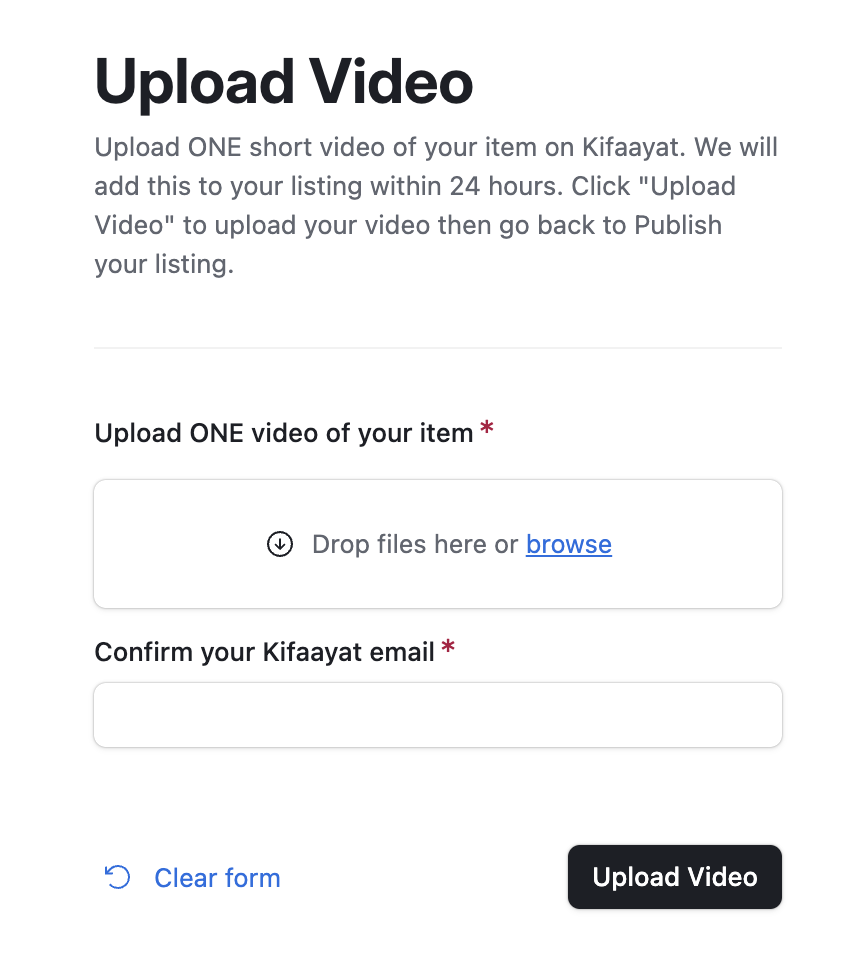
3. Click "Browse" and upload the file of your video. Only upload ONE video of the outfit you are uploading.
4. Confirm your Kifaayat email that you signed up with.
5. Click the "Upload Video" black button
6. Then click "Save Changes"

7. Once your listing is submitted and approved, please allow 1-2 business days for us to process the video and add it to your listing.
Please note video content may be used for our social media content purposes. By uploading videos or photos on Kifaayat you agree to our Terms & Conditions and Privacy policy. The video is embedded using the unlisted feature of YouTube.
Was this article helpful?
That’s Great!
Thank you for your feedback
Sorry! We couldn't be helpful
Thank you for your feedback
Feedback sent
We appreciate your effort and will try to fix the article